
Digital Assistant
Streamline the user experience with a digital assistant that helps your employees navigate and access information by voice or chat.
Coleman Digital Assistant (DA) is the Natural Language Processing (NLP) based chat agent of Infor Cloud and third-party applications.
It works based on “Skills”, which represent a given ability to get essential information, perform a business task or navigate to specific screen. You can invoke a skill either by chatting or speaking with Coleman from a variety of interfaces, like Infor OS Portal, MS teams, mobile application.
A single skill consists of utterances, prompts, and responses. Utterances are your questions to Coleman. Prompts and responses are provided by Coleman in response to your utterances.
Key Concepts & Definitions
Before diving into building your own skills, the following table provides you with Coleman DA key concepts for better understanding each component of a Coleman skill.
Coleman DA | Natural Language Processing (NLP) based chat agent of Infor Cloud and third-party applications. |
Skill | A question or a series of questions that define the interaction between Coleman and the user to perform a business task. |
Intent | Represents an action that a user would like to perform using chatbot. |
Utterance | The phrase(s) provided by the user to invoke a particular skill. |
Slot/Requirement | User input variable(s) required to fulfill the skill. Can also be represented as a dynamic variable, which changes with every skill invocation. |
Fulfillment | Determines how your skill is executed and the end results are accomplished. |
Skill Chaining | Invocation of a second related skill after the first skill is completed. You can pass values from the first skill to the second skill. |
API Endpoint | API Endpoints deployed on API Gateway are used by Coleman DA skills as a means to communicate with the application either to perform a transaction or get specific information. |
API Flow | A composite API build by chaining many APIs which can be used in an API Fulfilment. |
Basic Skill | Basic skills are used to create the FAQ interaction. Those skills don’t require any back-end communication with other applications, which means that the fulfillment won’t call any API. |
API Based Skill | Advanced skills are used when Coleman-User interaction requires the communication with a particular application. In order to communicate with an application, Coleman will use the API endpoint deployed on API Gateway either to get application specific information or perform a transaction. |
Drill-Back Skill | Drill-back skills can take you to a particular screen either within the Infor OS portal using the drill back links or navigate to a particular website just by defining its address within a skill. |
Coleman DA Channels | |
Infor OS Portal | The Coleman chat window is part of the Infor OS Portal that can be access in context of any application within the portal. It has both the text chat and voice interaction feature. |
Infor Go | Coleman DA chat agent is accessible from the mobile application, Infor Go. It supports both text chat or voice interaction. |
Microsoft Teams | The Coleman DA application can be download and installed to have a conversation in your Teams application like you would with a live user. You can converse with Coleman though MS Teams in context of a particular tenant. |
API | Coleman DA exposes a set of APIs which can be used to interact with Coleman programmatically. |
Infor OS Portal | The Coleman chat window is part of the Infor OS Portal that can be access in context of any application within the portal. It has both the text chat and voice interaction feature. |
Infor Go | Coleman DA chat agent is accessible from the mobile application, Infor Go. It supports both text chat or voice interaction. |
Microsoft Teams | The Coleman DA application can be download and installed to have a conversation in your Teams application like you would with a live user. You can converse with Coleman though MS Teams in context of a particular tenant. |
API | Coleman DA exposes a set of APIs which can be used to interact with Coleman programmatically. |
Skill Flow Example
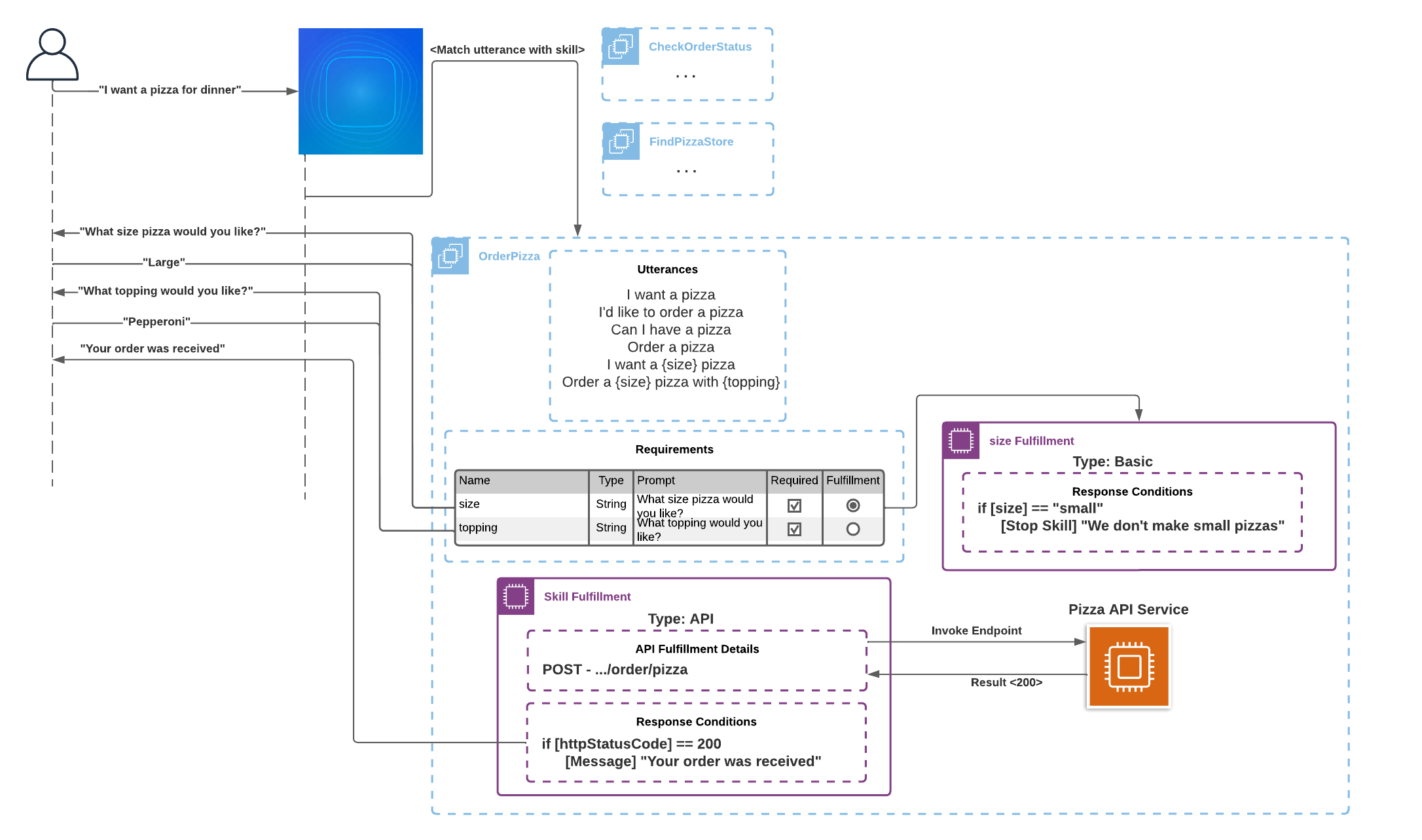

The diagram demonstrates the standard Coleman conversation flow from User skill invocation to Coleman’s final response. For better understanding of each component in the flow review the Table “
Best Practices
The table below presents the set of skill building ‘best-practices’ which helps in defining a high quality skills with desired UX:
Prompts | – For high-impact requests, consider a Confirmation Prompt before executing the Skill Fulfillment. |
Requirements | – Define up to 3 requirements. |
Responses | – Do not respond with raw API payload details unless they provide sufficient information. |
Security |
|
Skill Basics |
|
Utterances |
|
Want to learn more?
Topical videos
Need information on a specific feature, function or a quick overview? These short videos may be just what you are looking for. Check out our playlist on YouTube.
Product Documentation
Product documentation is the go-to reference for how specific parts of the product work. For online, searchable, easy to understand docs see the:
Coleman Digital Assistant User Guide
Community
Collaborating with others in your industry is a great way to learn and help others. Start participating in this component’s User Community today!
Courses
Infor U Campus offers Learning Paths that combine video-based and instructor-led training. If you are an Infor customer, then check out courses on Infor U Campus. We recommend the following courses specifically for this component:
On this page
- Digital Assistant