


Application Development with Mongoose
Go beyond basic fit and customize your cloud experience with extensibility tools that leverage no-code, low-code, and full-code frameworks.
Infor Mongoose is Infor’s rapid application development framework. It offers users a no-code, low-code, or full-code experience. This means our framework can benefit our customers regardless of their technical expertise.
Whether you are building an extension to one of our Infor ERP’s or building a complete stand-alone application, Mongoose will help you design, build, and deploy quickly and easily. Mongoose maximizes a developer’s time by utilizing various wizards to reduce the need to “drop into code” and by exploiting our flex layout, user components and HTML5 designer, you will be confident that Mongoose will provide you with the ability to create the UX/UI your company is looking to achieve.
The framework also comes with many built in features like, a full reporting engine, integrated workflow, full user management, and a robust background task manager. All things that most applications could need to leverage right at your fingertips.
Concepts & Definitions
Development Framework | A software framework that provides a standard structure and set of components to help developers build applications. |
Extensibility | The ability of a software system to be extended with new features or functionality without major changes to the existing code. |
Low Code | A development platform that provides a visual environment for building applications with little or no coding with the use of a library of pre-built components that can be assembled with drag-and drop. |
Full Code | The ability to include Custom Assemblies and form scripting to your application. |
Metadata | Data that translates and connects the backend data to the front end data. |
Runtime Mode | Mode in which users can use and interact with the application in normal day-to-day operations. |
Design Mode | Mode in which developers can edit and modify forms in the application. |
Components
Forms | A window through which you can interact with information in a database. |
Fields | An area within a record which is reserved for a specific piece of data. |
Records | A collection of values or fields of related information. |
Collections (IDOs) | An IDO (Intelligent Data Object) collection consists of a set of properties that make up a collection of information that can be API or table based. |
IDO Extension Class | a .NET class that allows developers to extend the functionality of an existing IDO by adding methods and event handlers. IDO extension classes are compiled into a .NET class library assembly and stored in the IDO metadata database. |
Application Event System | The application event system is a powerful and flexible set of tools that is designed to help extend and customize how the system works. You can use these tools to define and monitor application events across the system, rather than being limited to a single form. |
DataViews | Advanced data grids that you can create to query a custom set of data, quickly and easily. The basic DataView presentation is similar to an Excel spreadsheet, displaying data in columns. |
Critical Numbers | Key performance indicators, or KPIs, that you can use to get a quick view of important statistics or track progress. |
Runtime Builder | Tool used for a specialized set of Mongoose forms that are designed to allow authorized users to create simple forms in Runtime Mode, without having to enter into design mode. |
FormSync | Utility that can be used to retain and upgrade customizations made in the previous version of the application. It can also be used to copy customized objects from one forms database to another. |
Form Control | Form Control is a version-control tool for objects being developed for the presentation layer (client tier) of an application in Windows client. |
Key Benefits & Integrations
- Rapid Application Development
- Easy and powerful integration to ERPs
- Automatic Web Deployment and Multi-Device
- ION Enabled core toolset
- Cloud enabled for both dev and deployment
- Personalize applications, upgrade automatically
- Simple and flexible installation
- Full ION Integration
- Interfaces with JSON
- API Gateway Integration
- Restful Web Services
- DataLake/IoT
- Outrigger Connections
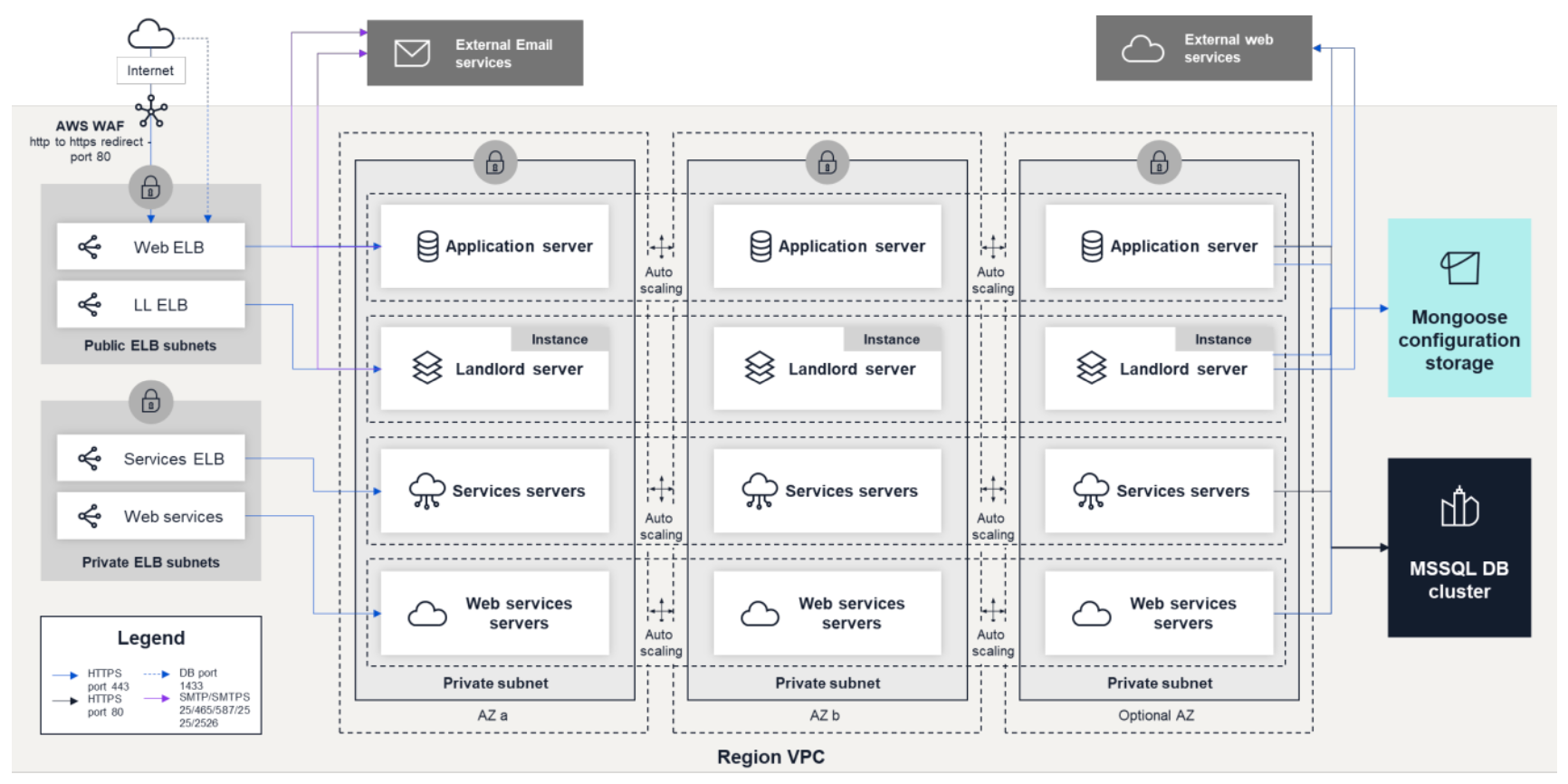
Architecture
Want to learn more?
Quick Reference
There are numerous valuable resources available to enhance your understanding of the Infor Platform. A quick reference sheet is one of the most helpful tools, which can provide a concise overview of key information. You may find the following Cheat Sheet particularly useful for your learning and reference purposes.
Courses
Infor U Campus offers learning tracks that combine video-based and instructor-led teaching. If you are an Infor customer, check out the Mongoose courses available on Infor U.
Topical videos
Need information on a specific feature, function or just a quick overview? These short videos may be just what you are looking for. Check out our playlist on YouTube.
Written Guides
Product documentation is the go-to reference for how specific parts of the product work. For online, searchable, easy to understand docs see this component’s documentation.
What made this section unhelpful for you?
On this page
- Application Development with Mongoose